Jose Hidalgo | Senior Full-Stack EngineerFull-Stack Engineer | Distributed Systems
HomeProjectsBlogStatusCV
ENES
Jose Hidalgo | Senior Full-Stack Engineer

Full-Stack Engineer | Distributed Systems

Engineered with clarity and intention.

Navigation

  • Home
  • Projects
  • Blog
  • Status
  • CV

Connect

GitHubLinkedInEmail
© 2026 Jose Hidalgo. All rights reserved.Back to top ↑
← Back to projects

Project

BDO Life Skill Companion

A Windows overlay companion app for Black Desert Online, built with Tauri 2 + Svelte 5 + TypeScript, migrated from a .NET WPF desktop application. Features a 981-recipe crafting database, inventory tracking, crafting planner with dependency trees, grinding tracker with 98 zones and 435 loot items, live boss timers, treasure progress tracking, a 3-mode adaptive view system (mini/medium/full), neon cyberpunk theming, and portable single-executable distribution.

Mar 25, 2026
8 views
RustTauriSvelteGamingOverlayDesktop-App
ShareXLinkedIn

How It Started

Black Desert Online has deep life skill systems, cooking, alchemy, and draughts, with hundreds of recipes, each requiring specific ingredients in specific quantities. Tracking what you have, what you need, and what to craft next meant juggling spreadsheets, wiki tabs, and mental math. The original BDO Life Skill Companion was built as a .NET WPF desktop app to solve this: a single overlay window that sits on top of the game, letting you search recipes, track inventory, and log crafting sessions without alt-tabbing.

The WPF version worked, but it was Windows-only, produced a 165MB bundle, and extending it with modern UI patterns was painful. The recipe database had grown to 981 recipes across three catalogs, with 759 item images, the app needed a better foundation.

The Migration to Tauri

The entire application was rewritten from scratch using Tauri 2 with a Svelte 5 frontend and a Rust backend. Tauri uses the system's native webview instead of bundling Chromium, which dropped the binary from 165MB to around 22MB. The Rust backend handles all persistence, reading and writing JSON and CSV files to a portable data directory next to the executable, while the Svelte frontend handles all UI rendering with reactive stores.

The migration followed an incremental strategy across four phases: foundation (models, stores, services), core UI (all five tab views), advanced features (import/export, recipe navigation, mini mode, boss timers), and enhancements (crafting planner, grinding tracker, treasure tracker, announcements). Each phase was validated against the original WPF behavior, and the Tauri version quickly surpassed feature parity with capabilities the WPF version never had.

Core Features

The crafting system is the heart of the app. 981 recipes across Cooking (427), Alchemy (508), and Draughts (46) are searchable with favorites, and each recipe shows its ingredients with live inventory counts. Clicking an ingredient navigates to recipes that produce it, and double-clicking jumps directly to that recipe's catalog. Alternative ingredients are supported, some recipes accept substitutions with different quantities, shown via an [alt] indicator with tooltips. The "Used In" section shows reverse lookups: every recipe that consumes the current item as an ingredient.

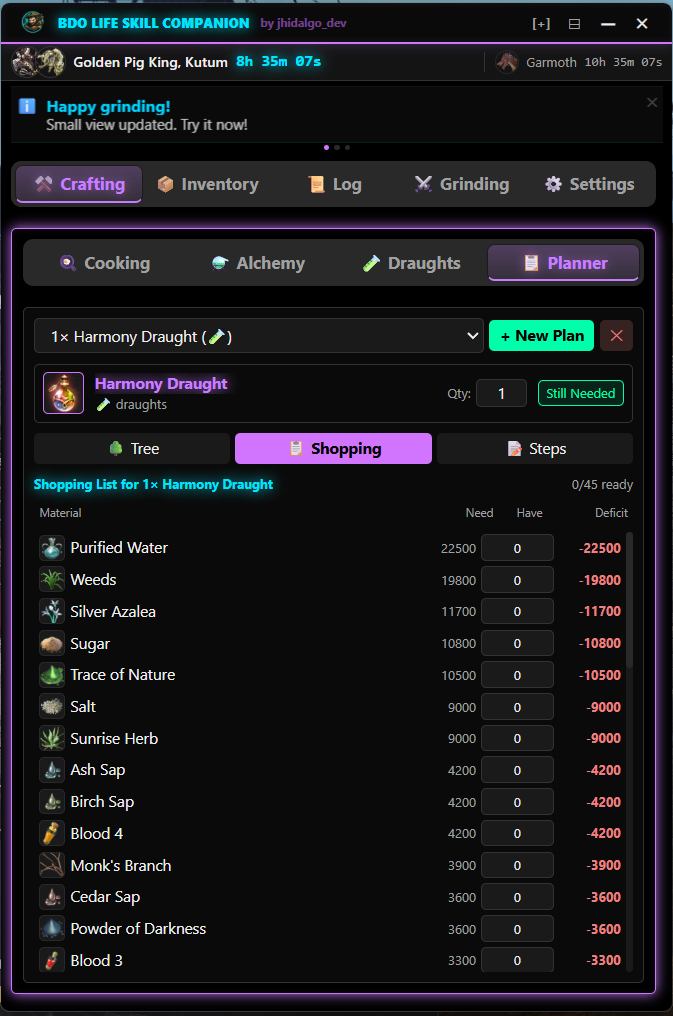
The Crafting Planner takes this further. Select any recipe, set the desired quantity, and the planner builds a full dependency tree, recursively resolving sub-recipes across all three catalogs with circular dependency detection. It subtracts what you already have in inventory and cascades the deficit downward. Three views present the plan: a collapsible Tree View showing the full hierarchy with need/have/deficit columns, a Shopping List aggregating all leaf materials, and a Steps View showing the bottom-up crafting order with checkboxes and a progress bar. Jump-to-craft lets you click any step to navigate directly to that recipe in the crafting tab.

Inventory management supports CSV import, export, and merge, letting players back up their tracked quantities or share them between machines. All quantities are editable inline, both in the inventory tab and directly within recipe ingredient lists.

Grinding & Boss Timers

The Grinding Tracker covers 98 grind zones with 435 unique loot items, each with its own icon and rarity grade (common through legendary). A two-column layout puts an SVG ring countdown timer on the left — with preset durations and play/pause/stop controls — and a zone search with loot tracking on the right. AP and DP fields are persisted per session, and completed sessions are logged with full loot breakdowns searchable in the Grinding Log.

The Treasure Tracker sits alongside grinding, tracking progress on BDO's five grindable treasure items — Compass, HP Potion, MP Potion, Archaeologist's Map, and Rich Merchant's Ring. Each treasure is broken into its component pieces with type badges (grind/craft/exchange), hours-spent tracking, and estimated time remaining based on your pace.

Boss timers track all 14 world bosses with EU and NA schedules, showing a live countdown to the next spawn with boss images and rare-boss indicators. Sound alerts fire a configurable number of minutes before a boss spawns. Game reset timers count down to daily reset, weekly reset, node war, and conquest war — all DST-aware per region. These timers are visible across all three view modes.

The 3-Mode View System

The app runs as an overlay on top of the game, so screen real estate matters. Three view modes address different situations. Full mode (560x680, resizable) is the complete tabbed interface with all five tabs — Crafting, Inventory, Log, Grinding, and Settings. Medium mode (560x170) compresses into a horizontal dashboard strip showing the boss countdown, reset timers, grinding session status, loot summary, and an announcement ticker. Mini mode (480x56) shrinks to a slim bar with a boss icon, countdown, recipe preview, and scrolling announcements.

Mini mode is context-aware: if you were on the Crafting tab, it shows your selected recipe and ingredients; if you were on the Grinding tab, it shows the active zone, timer, and loot count; otherwise it defaults to boss info. Users can cycle between modes via the logo button, or jump directly between any two modes using dedicated control buttons. Window size, position, and view mode are all persisted between sessions.

Design & Theming

The default neon cyberpunk theme uses a black background with purple (#C77DFF) as the primary accent, green (#00FF9D) for success and secondary highlights, and cyan (#00E5FF) for informational elements. Neon glow effects are driven by a CSS variable that toggles them globally. Two additional themes — Dark Minimal (muted blue-gray, no glow) and Light (light backgrounds for daytime) — are selectable from Settings. All themes swap via CSS custom properties on the root element.

UI design was done in a self-hosted Penpot instance connected to Claude Code via MCP, allowing designs to be created and queried programmatically. Wireframes for every view and state were built in Penpot first, then implemented in Svelte with precise adherence to the design specs — font sizes, spacing, colors, and layout proportions all matched the mockups.

Announcements & Branding

A remote announcement system fetches messages from a configurable API endpoint, caches them locally via the Rust backend, and displays them in a 3D cube-rotation carousel in full mode or a scrolling marquee ticker in compact modes. Announcements support four types, info, update, event, and warning — each with distinct color coding. Users can dismiss individual announcements, and stale dismissal IDs are cleaned up automatically. Polling happens every two hours and also piggybacks on boss alert events.

Key Technical Decisions

Tauri over Electron, Using the system webview instead of bundling Chromium cut the binary from 165MB to 22MB. The Rust backend provides safe, fast file I/O and HTTP fetching without a separate process.

Svelte 5 runes over external stores, Derived stores in .ts files crash the Tauri+SvelteKit+adapter-static combination. All derived state uses $derived runes inside .svelte files, while writable stores in .ts files handle global state. This pattern was discovered after debugging production crashes.

Portable-first distribution — All data (inventory, settings, logs, planner state, treasure progress) is stored in a data/ folder next to the executable. No installer, no AppData, no registry entries. Unzip and run.

Manual input only — A strict safety constraint: no game automation, no OCR, no screen reading, no memory reading, no DLL injection. Everything is entered manually by the player. This keeps the app firmly within the game's Terms of Service.

Design-driven development with Penpot MCP — A self-hosted Penpot instance connected via MCP allows querying design specs programmatically during implementation. Every component was designed as a wireframe first, then built to match, preventing the drift that happens when design and code evolve separately.

CSS variable theming — All three themes share the same component markup. Theme switching swaps a CSS class on the root element, which updates dozens of custom properties. A --neon-glow variable (1 or 0) drives conditional glow effects through calc(), no JavaScript branching needed for visual theme differences.