What It Does
BDO Life Skill Companion is a lightweight desktop overlay that sits on top of Black Desert Online while you play. It tracks crafting recipes, inventory quantities, grinding sessions, boss spawn timers, and treasure progress, all without alt-tabbing. The app was originally a .NET WPF application, and has since been fully rewritten using Tauri and Svelte to be smaller, faster, and portable.
Crafting & Recipes
The app ships with 981 recipes across three catalogs: - Cooking (427 recipes) - Alchemy (508 recipes) - Draughts (46 recipes) Each recipe shows its ingredients alongside your current inventory count. You can search, favorite, and navigate between recipes — clicking an ingredient finds recipes that produce it, and double-clicking jumps straight to that recipe’s catalog. Some recipes support alternative ingredients, shown with an [alt] indicator and tooltip. The "Used In" section gives you reverse lookups: every recipe that uses the current item.
Crafting Planner
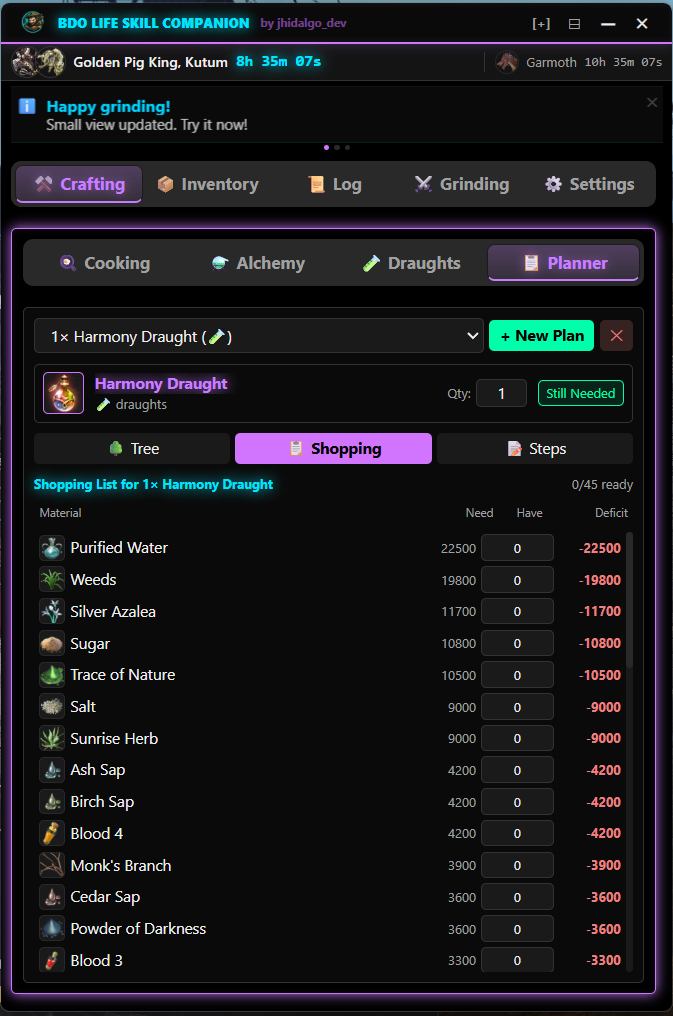
The planner builds a full dependency tree for any recipe. Pick what you want to craft, set the quantity, and it resolves every sub-recipe across all three catalogs, with circular dependency detection and inventory-aware cascading that subtracts what you already have. Three views present the plan: - Tree View — collapsible hierarchy with need/have/deficit columns - Shopping List — aggregated leaf materials you need to gather - Steps View — bottom-up crafting order with checkboxes, a progress bar, and jump-to-craft navigation
Grinding & Treasures
The Grinding Tracker covers 98 zones with 435 loot items, each with icons and rarity grades from common to legendary. You get a countdown timer with presets (1m–30m), AP/DP fields, and full session logging with loot breakdowns. The Treasure Tracker sits alongside it, tracking all 5 grindable treasures (Compass, HP Potion, MP Potion, Archaeologist’s Map, Rich Merchant’s Ring). Each treasure breaks down into individual pieces with type badges, hours-spent tracking, and estimated time remaining based on your pace.
Boss Timers & Alerts
Live countdowns for all 14 world bosses with EU and NA schedules. Rare bosses are visually dimmed. Sound alerts fire a configurable number of minutes before a spawn. Game reset timers track daily reset, weekly reset, node war, and conquest war — all DST-aware per region. A remote announcement system delivers dismissible cards with auto-polling.
The Overlay System
The app adapts to how much screen space you can spare with three view modes: - Full (560x680, resizable) — the complete tabbed interface with 5 tabs - Medium (560x170) — a horizontal dashboard strip: boss countdown, reset timers, grinding status, announcements - Mini (480x56) — a slim bar with boss icon, countdown, recipe preview, and scrolling announcements Mini mode is context-aware — it shows different content depending on which tab you were last using. Click-through mode (Ctrl+Shift+L) makes the overlay transparent to mouse input so it never blocks gameplay. Window size, position, and view mode persist between sessions. Three themes are available: Neon Cyberpunk, Dark Minimal, and Light.
What’s Next
Notification System — Expanding beyond boss alerts into a broader framework covering daily resets, imperial deliveries, and other recurring events. The approach will build on the existing boss alert infrastructure, extending it with configurable event types and a unified notification queue.
Fishing Log per Zone — A zone-based fishing tracker to log catches, track hotspot rotations, and build a personal reference of what fish appear where. The implementation will follow the same pattern as the grinding tracker, zone selection, session logging, and history review, reusing the existing store and persistence patterns.
Marketplace Live Pricing — Pulling live market prices to calculate silver/hour for grinding sessions and profit margins for crafting recipes. This will wire into the existing planner and tracker, adding economic context — not just "what do I need" but "is it worth crafting vs buying." The Rust backend already handles HTTP fetching, so the data pipeline is straightforward.